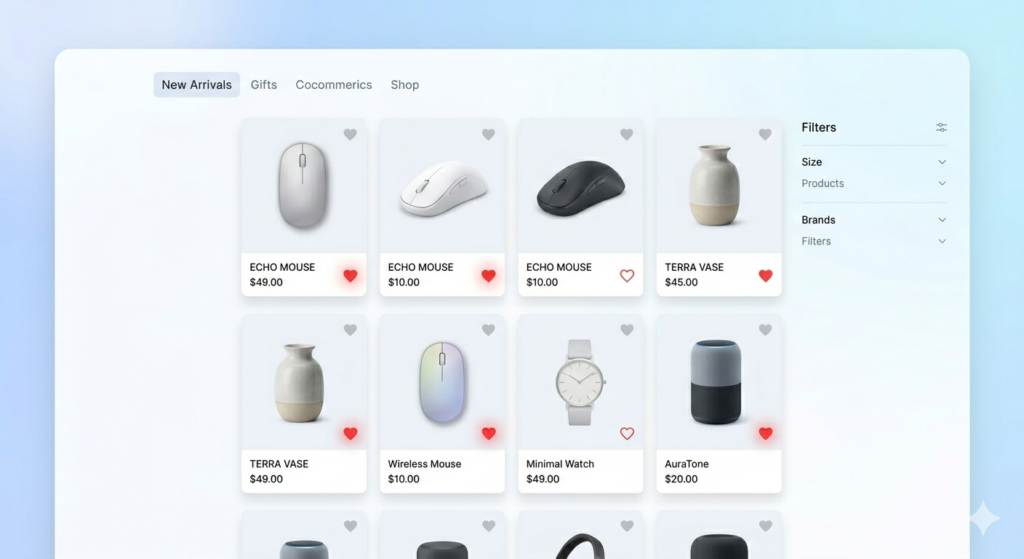
Every online store loses customers who “want to buy later” — and then forget.
The solution is simple: add a WooCommerce wishlist plugin to your store. It lets shoppers save their favorite products and come back when they’re ready. And one of the best tools for this right now is GoWishCart.
What Is a WooCommerce Wishlist Plugin?
A WooCommerce wishlist plugin adds a “Save to Wishlist” feature to your product pages. Customers can heart or bookmark items they like — and return to purchase them later.
This small feature can have a huge impact on your store’s revenue. It reduces bounce rates, increases return visits, and gives you real data about what your customers want.
Why Every WooCommerce Store Needs a Wishlist
Stop Losing Interested Shoppers
Without a wishlist, a visitor who isn’t ready to buy has only one option: leave. With a wishlist, they stay connected to your store.
Understand Customer Demand
Wishlist data tells you which products your customers love most. This helps you with inventory decisions, promotions, and marketing.
Build Email Marketing Campaigns
When you know what’s on a customer’s wishlist, you can send personalized emails — price drop alerts, back-in-stock notifications, and more.
GoWishCart — A Powerful Wishlist Plugin
GoWishCart is a free WordPress plugin built for FluentCart stores. It brings all the wishlist features you’d expect from a premium plugin — completely free.
Here’s what makes it stand out:
❤️ Wishlist Button on Every Product
GoWishCart adds a heart button to your product pages automatically. No shortcodes, no manual setup — it just works.
👤 Guest Wishlist (No Login Required)
Customers can save products even without creating an account. This removes a major friction point and keeps more visitors engaged.
🎨 Variation-Level Saving
If your products have size, color, or other variants, GoWishCart saves the exact variant the customer selected — not just the product.
💰 Price Drop Notifications
Set up automatic emails when a wishlisted product goes on sale. This is one of the highest-converting email triggers in eCommerce.
📦 Back in Stock Alerts
Never lose a sale to an out-of-stock message again. GoWishCart notifies customers automatically when their saved product is available again.
📧 FluentCRM Integration
Connect your wishlist data to FluentCRM and build powerful automated sequences that turn saved products into completed orders.
How to Set Up GoWishCart
Step 1 — Install GoWishCart In your WordPress dashboard, go to Plugins → Add New, search for GoWishCart, and install it.
Step 2 — Activate the Plugin Click Activate and you’re ready to configure.
Step 3 — Wishlist Button Appears Automatically The plugin adds the wishlist heart button to your product pages right away — no extra setup needed.
Step 4 — Customers Start Saving Products Your shoppers click the heart icon to save products. Guest users are supported too.
Step 5 — Automated Notifications Go Out Price drops and stock updates trigger automatic emails to bring customers back.
Benefits of a Wishlist Plugin
- Customers return to buy instead of forgetting your store
- You collect valuable product interest data
- Email campaigns become smarter and more targeted
- Conversion rates improve over time
- Zero coding required
Use Cases
Fashion and Apparel Stores
Customers save styles they love. When a size comes back in stock, they get notified instantly — and usually buy.
Electronics and Gadgets
High-ticket items often require research time. A wishlist gives buyers a place to “park” products while they decide.
Digital Products and Courses
Wishlist + price drop alert = the perfect combination for converting interested visitors into paying students or subscribers.
Pros and Cons
✅ Pros
- Free plugin on WordPress.org
- Guest wishlist — no account needed
- Product variation saving
- Price drop and restock notifications
- FluentCRM email automation
- Simple and clean UI
❌ Cons
- Designed for FluentCart, not WooCommerce natively
- Requires FluentCRM for full automation features
Conclusion
Adding a WooCommerce wishlist plugin to your store is one of the easiest ways to increase sales without spending more on ads. You’re simply capturing the interest that’s already there.
GoWishCart gives you all the wishlist features you need — for free.
👉 Get GoWishCart from WordPress.org and start turning saved products into real revenue.