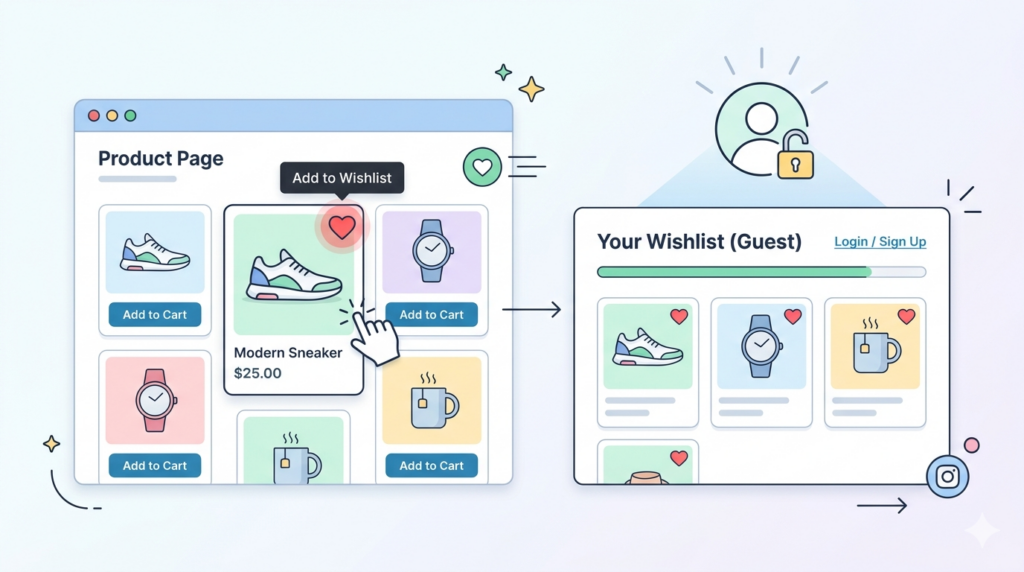
A wishlist is one of the most useful features in an online store.
It lets shoppers save products they like and return later. But many WordPress stores make one mistake: they only allow wishlists for logged-in users.
That means a visitor must create an account before saving a product.
For many shoppers, that is too much work.
A guest wishlist solves this problem. It lets visitors save products without logging in. For FluentCart stores, the GoWishCart – Wishlist for FluentCart plugin supports guest wishlist functionality, allowing customers to create and manage wishlists without creating an account.
What Is a Guest Wishlist in WordPress?
A guest wishlist is a product-saving system for users who are not logged in.
Instead of requiring an account, the website remembers the visitor’s saved products during their browsing session. This allows the visitor to keep shopping, compare items, and return to their saved list.
In GoWishCart, guest wishlists use session-based cookies. The plugin also mentions optional email capture, which can help with notifications and future account conversion.
Simple Explanation for Store Owners
Think of a guest wishlist like a temporary shopping memory.
A customer visits your store.
They click “Add to Wishlist.”
The product is saved.
They continue browsing.
They open the wishlist page.
They see the products they saved.
They can later add those products to the cart.
The customer does not need to create an account first.
This is helpful because many customers want to explore before they commit.
Why No-Login Wishlists Are Important
A no-login wishlist improves the customer journey.
When users are forced to create an account too early, they may leave. But when users can save products first, they feel more comfortable.
A guest wishlist is especially useful for mobile shoppers. Typing account details on a phone can be annoying. A simple wishlist button is much easier.
It is also useful for first-time visitors. They may not trust your store yet. Letting them save products without registration gives them a softer first step.
How GoWishCart Handles Guest Wishlists
GoWishCart is made for FluentCart stores. The plugin description says customers can save products, save selected product variations, manage wishlists as logged-in or guest users, and receive optional price-drop and back-in-stock notifications.
This means a visitor can save items even before becoming a registered customer.
The plugin also supports product variations. For example, if a customer selects a specific size or color and adds it to the wishlist, GoWishCart saves that selected variation.
That is important for stores selling products with options.
Example: Product Variation Wishlist
Let’s say your FluentCart store sells T-shirts.
A customer selects:
Size: Large
Color: Black
Then the customer clicks “Add to Wishlist.”
A basic wishlist might only save the main T-shirt product. But GoWishCart supports saving selected product variations, so the exact selected version can be stored.
This creates a better shopping experience because the customer does not need to select the variation again later.
How the Wishlist Page Works
A wishlist page is where customers can view their saved products.
GoWishCart allows store admins to choose or create a wishlist page. The plugin also supports the [gowishcart_wishlist] shortcode, which can be used to display the wishlist on any page.
For example, you can create a page called “My Wishlist” and add this shortcode:
[gowishcart_wishlist]
Then visitors can access their saved products from that page.
How the Wishlist Button Works
The wishlist button is usually shown on product pages.
GoWishCart allows admins to control button placement on product pages and shop/archive pages. Store owners can also customize button text and icons.
This means you can decide how the wishlist button appears to customers.
Example button text:
Add to Wishlist
Save for Later
Add to Favorites
Save This Product
Good button text should be clear and simple.
Can Guest Wishlists Help Email Marketing?
Yes, guest wishlists can support email marketing if you collect email addresses with permission.
GoWishCart supports optional FluentCRM automation triggers. The plugin page says automation can trigger when a product is added to a wishlist, removed from a wishlist, when a price drops, or when an item comes back in stock.
This can help store owners send more relevant messages.
For example:
A customer saves a product.
Later, the product price drops.
The store sends a price-drop notification.
The customer returns and buys.
This is more targeted than sending general promotional emails.
Guest Wishlist FAQ
Can guests save wishlists in WordPress?
Yes. Guests can save wishlists in WordPress when the wishlist plugin supports guest users. GoWishCart supports guest wishlist creation and management for FluentCart stores.
Does GoWishCart require FluentCart?
Yes. GoWishCart is built specifically for FluentCart and requires FluentCart to be installed and activated.
Can customers save product variations?
Yes. GoWishCart supports product variations, so selected options like size or color can be saved in the wishlist.
Can I show the wishlist button on the shop page?
Yes. GoWishCart includes an option to show wishlist buttons on shop/archive pages.
Can I customize the wishlist button?
Yes. You can customize button position, icons, and text labels.
Best Practices for Guest Wishlists
Use clear button text. “Add to Wishlist” is simple and easy to understand.
Add a wishlist link in your menu. Customers should be able to find their saved products quickly.
Use the wishlist page shortcode correctly. GoWishCart supports [gowishcart_wishlist] for displaying the wishlist page.
Test guest mode. Open your site in a private browser window and check if the wishlist works without login.
Make the wishlist button visible on product pages and shop pages.
Use email capture carefully. Only collect email addresses with clear permission.
Final Thoughts
Guest wishlists make WordPress ecommerce easier for visitors.
Instead of forcing users to create an account, you can let them save products first. This creates a smoother shopping journey and may help bring interested shoppers back later.
For FluentCart users, GoWishCart is designed to add wishlist functionality with guest support, variation support, customizable buttons, wishlist shortcodes, and optional FluentCRM automation.